







































































4. FG3 Interface and Button Overview
FG3 Interfaces and Buttons
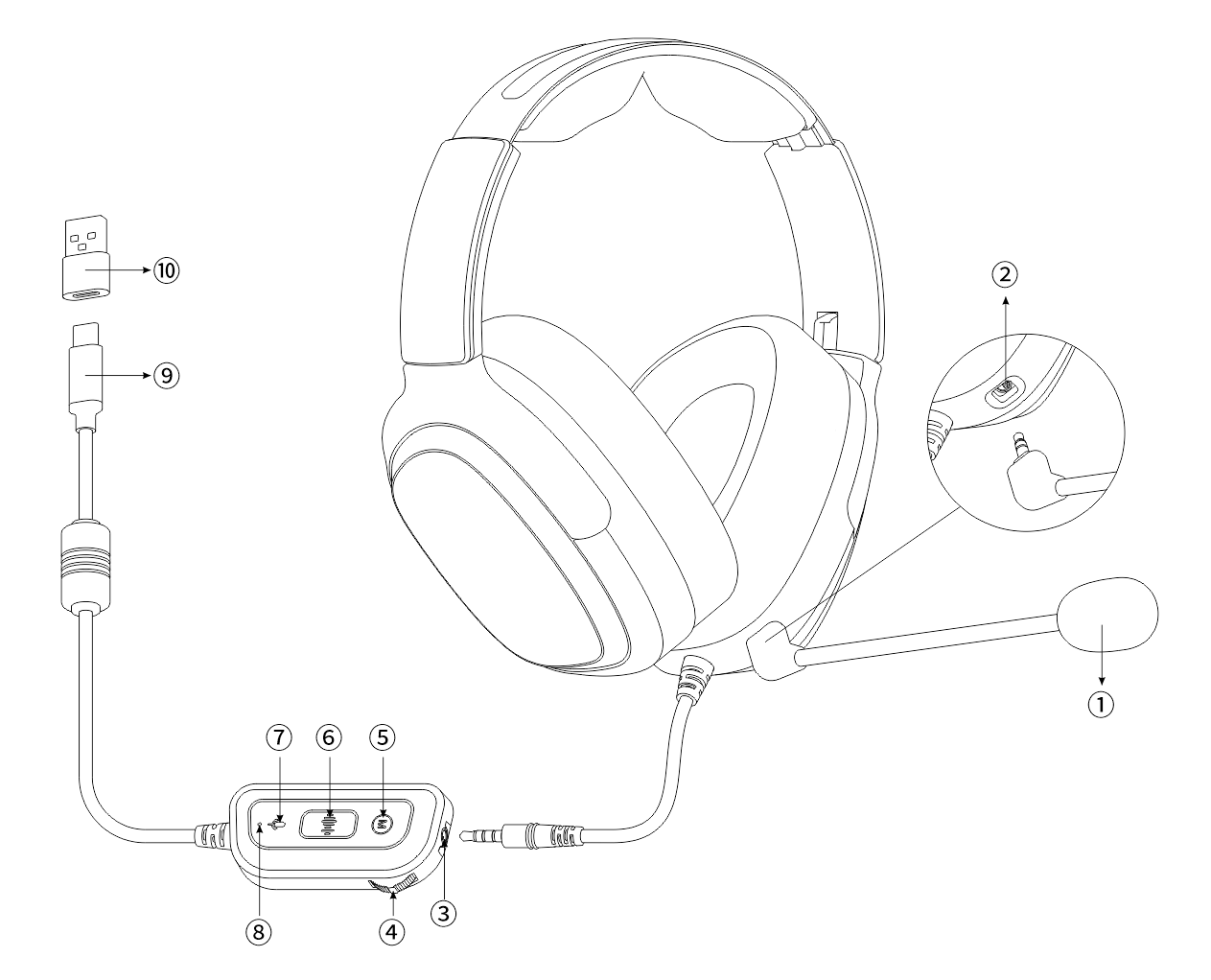
1. Detachable microphone
2. Microphone jack
3. Headphone jack
4. Volume control switch
5. Scene sound effect switching button
6. Scene sound effect audio indicator light
7. Microphone mute/unmute button
8. Microphone mute indicator light
9. Type-C plug
10. USB-A to Type-C adapter
Button Operation Instructions
Scene sound effect switching button: Click to switch sound effects
Game sound effect: Blue breathing indicator light
Movie sound effect: Orange breathing indicator light
Music sound effect: Green breathing indicator light
Microphone mute/unmute button: Click to toggle on/off
When microphone is on: Microphone indicator light is off
When microphone is muted: Microphone mute indicator light is solid red
Volume control switch: Adjust volume and audio mute switch
Increase volume: Slide up
Decrease volume: Slide down
Audio mute switch: Press the middle of the switch to toggle audio mute. When muted, the indicator light is solid red; when unmuted, the indicator light returns to the scene sound effect breathing indicator light.
