







































































3. QX11 multi-function button, screen, and headphone jack description
Multi-function button function description
Multi-function button: Single click, double click, and long press can all be customized with built-in functions. You can enter the menu to customize the multi-function knob functions.
Customizable functions: No function, EQ increase, EQ decrease, mode switch, theme switch, screen rotation, next track, previous track.
D.MODE desktop amplifier mode switch:
Set the D.MODE switch to ON. When the main USB port has sufficient power supply capability or an adapter is connected to the side power port, it will activate high-voltage power supply and parallel drive, delivering desktop amplifier-level output.
Priority of the 3.5mm and 4.4mm headphone jacks
Both headphone jacks will output at the same time. It is not recommended to use two headphones at the same time.
Screen description
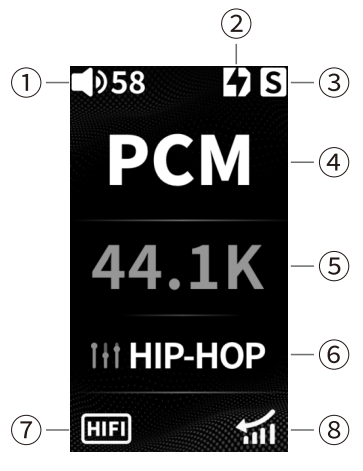
① Current volume level: displays the current volume level.
② Desktop mode: displays the desktop mode status.
③ Coaxial output: this icon indicates that coaxial output is turned on.
④ Track format display area: displays the track format of the current playback status.
⑤ Track sampling rate display area: displays the track sampling rate of the current playback status.
⑥ EQ mode: displays the EQ selection status.
⑦ Working mode: HIFI mode or game mode.
⑧ Current gain: displays the high/low gain status.
