





































































3. M25/M25 R2R buttons, multifunction buttons, and ports
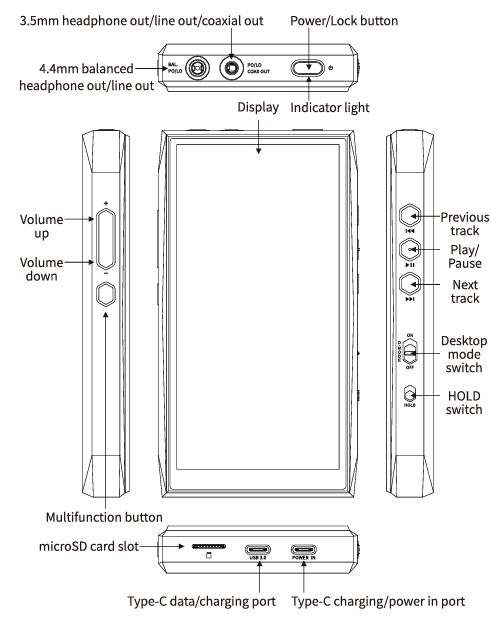
Functions of the two USB Type-C ports
The port marked USB 3.0 supports data transmission and charging, USB Host, USB OTG, USB DAC, and other functions.
The port marked POWER IN supports charging and power input only. It cannot be used to transfer data to or from a computer.
Note: Both USB ports support PD fast charging. Other charging protocols are recognized as standard charging.
How to use the multifunction button
-
In Player mode, the button can be assigned to: Add to Favorites (default), play a random next track, Play/Pause, delete the currently playing track, cycle through EQ settings, enter USB DAC mode, enter Bluetooth Receiving mode, lock/wake the screen, enter/exit Cassette mode, enter/exit Pod mode, open the drop-down menu, switch the personalized sound profile, open the side volume bar, or No function.
-
In Bluetooth Receiving mode and USB DAC mode, the multifunction button is always set to No function.
Note: This button responds only in Android mode and Pure Music mode. Some functions are available only in FiiO Music.
Output priority between the 3.5 mm and 4.4 mm headphone outputs
The output connected first has priority. For example, if a device is connected to the 3.5mm output before another device is connected to the 4.4mm output, sound will continue to come from the 3.5mm output.
To ensure optimal output performance, simultaneous output from both headphone ports is not supported.
Which microSD Card is recommended?
MicroSD cards with capacities of up to 2TB are supported. SanDisk cards are recommended.
